Work with Rule Engine
Rule Engine is an application that performs automated decision-making based on predefined rules.
Configuration
Tag Assignment
Rule Engine will process each message assigned to a Device and Business Flow incoming to Data Engine - currently only for IoT Devices (ADT main), Location Analytics cases are not included in the flow.
In order to start, the devices that should have messages processed by Rule Engine, should have assigned Tag. Next, the same Tag should be assigned to a Business Flow.

Business Flows
Business Flow consists of Conditions, that are simple logical operations that can be executed on current or historical payload. Conditions can be linked in Condition Groups with AND or OR logical operator. User can create multiple Condition Groups and link them as well with AND or OR operators. The result of processing a Condition or Grouped Conditions is boolean (true or false). User can define as well the Actions, currently it's SMS or Email. User can define recipients (if multiple, each recipient should be comma separated), a message and - for Email - a subject. In subject or message, the placeholders can be defined, placeholders can be used only for fields of current payload.
Example: if the subject will be set to [{CurrentValue.DeviceId}] used spaces {CurrentValue.UsedSpaces} out of {CurrentValue.TotalSpaces} the subject of sent email will be: [device012] used spaces 40 out of 50. In order to verify what placeholder to use, the DST Product Mapping should checked (the value of placeholder should be exactly the same as DST path field).
If the result of Condition processing is true, Rule Engine will proceed to execute the Actions.
Conditions
A Condition can be one 1 of 4 Activity types:
| Type | Description | Activity Value available |
|---|---|---|
Compare | Compare 2 values, Compare type is required to be set | Current Message, Constant Value, Previous Message, Last X Messages, Last Time Span Messages |
Exists | Check if the field defined in Path exists | Current Message |
Exists Any | Check if the field defined in Path exists in any of checked messages | Last X Messages, Last Time Span Messages |
Exists All | Check if the field defined in Path is present as many times as defined in Expected Count | Last X Messages, Last Time Span Messages |
Compare Count | For fields with " | " separated values, user has to define Violation Threshold Count to define how many times value should exceed defined threshold before firing an alarm | Current Message, Constant Value, Previous Message, Last X Messages, Last Time Span Messages |
Compare Consecutive Count | For fields with " | " separated values, user has to define Violation Threshold Count to define how many times consecutive value (e.g.: violation count = 2, threshold = 30 field: "25|31|35|23", result is triggered alarm) should exceed defined threshold before firing an alarm | Current Message, Constant Value, Previous Message, Last X Messages, Last Time Span Messages |
Activity Values:
| Type | Description |
|---|---|
Current Message | Get value from indicated Path. Optionally Apply to all the latest messages for current tag can be set, then all latest values of defined Path and the same Tag will be fetched and Summed up (Sum) or calculated an Average |
Constant Value | A constant value to which other values can be compared to |
Previous Message | Get value of Path from previous message of this device |
Last X Messages | Defined No. of Messages will be fetched and the Path value will be calculated to Sum or Average |
Last Time Span Messages | Similar to Last X Messages, but instead of defining count of messages to be fetched, the time span is set: Scale: Minutes - M, Hours - H, Days - D, Amount (of minutes, hours, day): numeric value, the math calculation has to be set too (Sum or Average) |
Once Action is executed, it should be delivered in a form of SMS or Email to defined Recipients. If not, something could go wrong, and failed SMS or Email was sent to Dead Letter Queue (DLQ). Check Rule Engine Action Processor documentation for details.
Tag hierarchy handling
You can assign children tags to Devices and a parent tag to a Business Flow. In this case for messages from devices assigned to the children tag, will be processed against the Business Flow assigned to a parent tag.
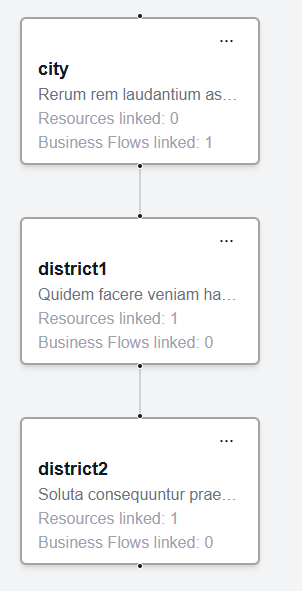
In this case, messages from devices assigned to tags district1 or district2 will be processed against a business flow assigned to city tag.
How to logic works in detail:
- message from a device comes in Rule Engine
- Get device by device name and its tags
- for each tag fetch recursively their ancestors (parents)
- get all active business flows for the found tag family
- process business flows