User roles in Data Engine
Introduction
Roles in Data Engine can be defined and configured only within the application (e.g.: MyProximus doesn't have any influence on it).
Currently there are 7 roles existing:
- Super Admin (only for Prx - can do everything)
- Super User (only for Prx - can access everything, read only)
- Organization Admin Global (has access read/write access to all resources of one Organization)
- Organization Admin Local - has to have assigned Tag (has access read/write access to resources assigned to same Tag or its children)
- Organization User Global (has access read access to all resources of one Organization)
- Organization User Local - has to have assigned Tag (has access read access to resources assigned to same Tag or its children)
- Proximus Support - (only for Prx 2nd line support) - support role - has access to everything and can do almost everything except of deleting Organizations and editing Products
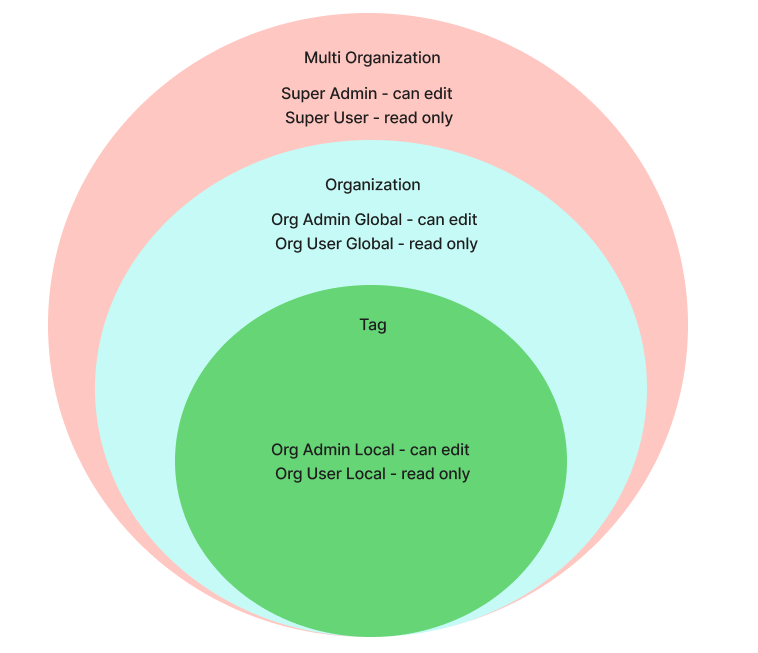
Resources such as Devices, Solution Dashboards and Business Flows can be assigned to Tags, by doing it, we can limit access to certain Local role.
CASL
Data filtering by Tags is working by extending already existing logic implemented with CASL library.
Permissions for each role are stored in database in auth_permission table.
They are defined by resource, actions, effect and condition.
Table below shows permissions defined for Organization Admin Global
| Resource | Actions | Effect | Condition |
|---|---|---|---|
| User | {ASSIGN,READ,UPDATE} | ALLOW | {"organizationId": "${P.id}"} |
| Organization | {READ} | ALLOW | {"id": "${P.id}"} |
| Project | {READ} | ALLOW | {"organizationId": "${P.id}"} |
| ProjectDashboard | {READ} | ALLOW | {"project": {"is": {"organizationId": "${P.id}"}}} |
| Device | {MANAGE} | ALLOW | {"organizationId": "${P.id}"} |
| Product | {READ} | ALLOW | |
| ProductDeviceMapping | {READ} | DENY | |
| Tag | {MANAGE} | ALLOW | {"organizationId": "${P.id}"} |
| BusinessFlow | {MANAGE} | ALLOW | {"organizationId": "${P.id}"} |
| Stream | {READ} | ALLOW | {"organizationId": "${P.id}"} |
Gatekeeper service will process each request coming in (using validate or checkbyUser functions for POST/PUT/DELETE requests and FilterUtil for GET requests) and either assess, if requesting user has access to requested resources or add extra filter on DB query to return only allowed resources.
The condition column defines really the piece of query to be inserted in the prisma query, appropriate logic will replace placeholders (such as ${P.id}) with correct data.
For Tag data limitation there are extra conditions added, for example condition for Device resource for Organization User Local is: { organizationId: "${P.id}", tags: { some: { id: { in: "${V.tags}" }}}}
All roles and permissions are defined in the index.ts file of seed -> so it's the file storing correct configuration, useful for unit testing of backend. In seed file objects created by AuthRoleFactory are defining each role.